
What a Mexico pterodactyl AI template is
A Mexico pterodactyl AI template is a fixed TikTok clip that your video follows. There are three: On a chain, Caught it and Rooftop pet. You take the place of the person in the clip. The pterodactyl, the place, the camera moves and the sound stay the same.
Each template comes from the pterodactyl meme trend on TikTok, where people posted themselves with "their" pterodactyl. These are not the Juárez clips that started the story. No source has shown that any of those is a real pterodactyl; the details are in our article on whether the Mexico pterodactyl video is real.
Where the templates come from: the Mexico pterodactyl meme & trend, post by post.
On a chain, second by second
On a chain is the first template. It is based on @lawrencesanchez210's TikTok from Nov 16, 2026, which has about 800K plays. It is one handheld shot, about 10 seconds long, with no cuts.
- 0 to 2 s. A man walks a pterodactyl on a chain across a shiny black-tiled hall.
- 2 to 6.5 s. The camera comes round to the pterodactyl's head and collar. The pterodactyl opens its long beak.
- 6.5 to 10 s. The camera goes back to the man beside it. He sorts out the chain in his hands.
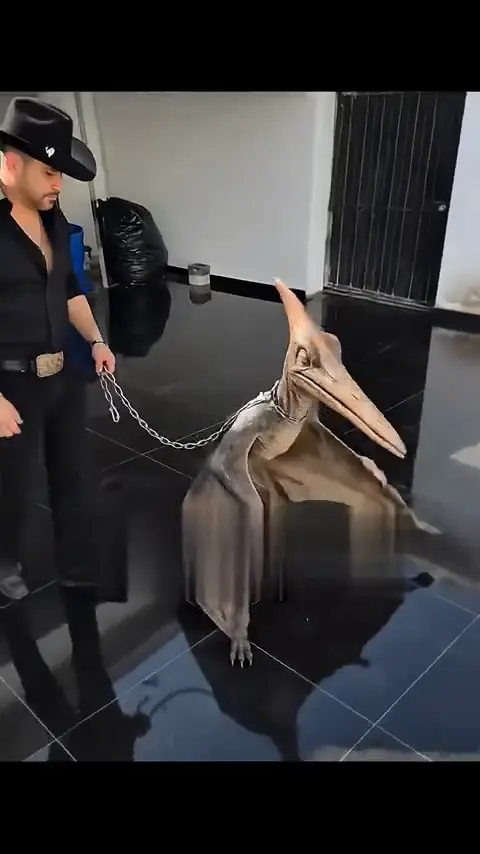
In your video, you take the man's place. You walk the pterodactyl across the hall, and you are the one sorting out the chain at the end.
What your photo changes in the template, and what stays
When your photo goes in, only the person changes.
What changes
- The person. The man in the clip becomes you, with your face and hair.
- The clothes. The clothes in your photo are the clothes in the video.
What stays
- The pterodactyl, with its chain and collar.
- The place, the hall with the shiny black tiles.
- The camera moves. One handheld shot, no cuts, the same timing.
- The sound from the clip.
What is left out
- The post's caption. It is not in the template.
The finished video is vertical and has sound. It comes in Standard or HD, depending on the pack you bought.
Caught it and Rooftop pet, the other two templates
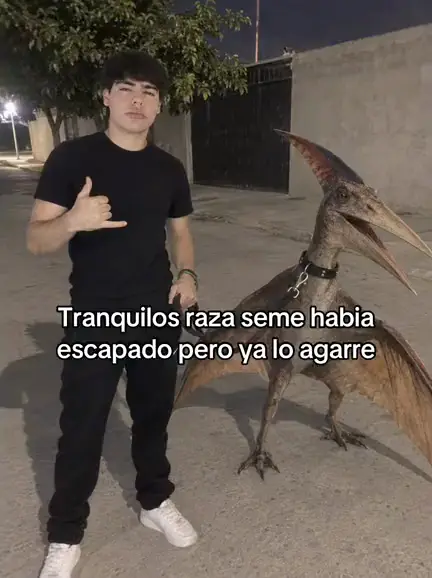
Caught it is based on @jose_angel_701's TikTok from Nov 14, which has about 590K plays. At night on a street, a young man stands beside a pterodactyl wearing a collar. The post was captioned «Tranquilos raza, se me había escapado pero ya lo agarré». In your video, you are the one beside it.
Rooftop pet is based on @elmundodenube's TikTok, which has about 126K plays. A woman stands on a rooftop beside her "pet" pterodactyl. In your video, you are the one beside it.
Which template to pick
- On a chain if you want the pterodactyl up close, beak and all.
- Caught it if you want the night street from the «ya lo agarré» post.
- Rooftop pet if you want it as a pet, up on a roof.
What "Add your own details" can change in the video
"Add your own details" is a box on the home page. It is optional. Use it for small things about you:
- Clothes, like "in a black leather jacket".
- A hat, like "in a white cowboy hat".
- Small things, like "with a silver watch".
What you cannot change is the rest of the clip. The pterodactyl, the place and the camera moves follow the template. So a line about a new place or a new move does not belong in the box.
Why the template has nothing to edit
There is no app and nothing to edit. The template is already set up on the home page. The clip, the timing and the sound are fixed, so there is nothing to cut or line up.
Your part is short. Pick a template, add a photo, tick the box and press "Make my pterodactyl video". For the full walk-through, with the photos that work best and how to post it, see how to make the video.
Photo templates for stills
For a still photo instead of a video, go to Mexico Pterodactyl AI Photo. Add a photo, pick a template picture, add your own details if you like, and get a still photo of you with the pterodactyl.
The pictures are on a chain at night ("ya lo agarré"), it took my dog, party crasher, caught on camera and selfie with it. Everyone's first photo there is a preview with a watermark.
Use a Mexico pterodactyl AI template